API handling
AmazonSync has now been updated to use the new orders API so to optimize the requests performed towards Amazon and group more countires in a single webcall.
Let’s see what operations can lead to reaching the Amazon limits within a certain amount of time. In general, the vast majority of operations that leads to a high API usage is the orders download functionality.
- Orders download: Amazon counts 1 webcall each 100 orders. If you configured within the module a very high date range (i.e. 30 days) and you need to download (for example) 400 orders, a single request will count as 4 towards Amazon.
- Pending orders / Orders with errors: each request for a single order counts as 1 webcall towards Amazon.
- Inventory download: 1 single inventory download request to associate ASINs and import within AmazonSync stocks still on sale on Amazon (so to let the orphaned products functionality work properly) consumes 2 Amazon webcalls.
- Listings report download: 1 webcall for each file in which the feed sent to Amazon will be subdivided into. These webcalls can be avoided by checking the upload status on Seller Central, as explained here.
- Shipping template: it consumes 1 webcall only.
WEBCALLS AMOUNT FOR 1 COUNTRY
In order to get an idea of how many webcalls can be used per month let’s take as an example a country with less than 100 orders, where the orders download was configured 3 times per hour and the inventory download 2 times per hour.
The total count becomes:
3 * 24 = 72 orders requests per day
72 * 30 = 2160 orders requests per month
2 * 24 = 48 inventory requests per day
48 *30 = 1440 inventory requests per month
If you download orders for each of the 11 countries supported by the module using the same frequency, in a month the total will be:
2160 * 11 = 23760
Add to this value the 1440 webcalls for the inventory download, for a total of 25200 webcalls.
HOW TO OPTIMIZE CRONs
AmazonSync supports more than 10 different countries. This always required the need for configuring a single CRON for each country, with the result of causing possible confusion server side or wrong configurations, where more CRONs were started at the same time for different countries, leading to finishing the available webcalls towards Amazon for a certain amount of time.
Up to today, a typical CRON configuration could be:
ore 10:00 Italy CRON
ore 10:05 France CRON
ore 10:10 Spain CRON
ore 10:15 Germany CRON
ore 10:20 UK CRON
etc. As explained before, each orders webcall is then subdivided into block of 100 each (limit set by Amazon).
BEFORE
Let’s suppose we have 350 unshipped orders on Amazon and we want to get them all. The behavior we had was the following one.
One single orders request used to lead to N + N * 100 webcalls: orders would get subdivided into 100 blocks each, then we would have to perform one single call for each order to get the products list. In our example, 1 single request would then consume 354 requests.
AFTER
Starting from version 2.6.0 of the AmazonSync module for Prestashop, instead, orders handling becomes like this:
Amazon now provides the products’ information together with shipping data: 1 single orders request now consumes 4 webcalls instead of the 354 of the old system.
HOW TO OPTIMIZE CRONs
AmazonSync supports more than 10 different countries. This always required to configure one CRON for each country, with the risk of generating confusion or misconfigurations server side, with multiple CRONs started at the same time for different countries, leading to consuming all the webcalls available towards Amazon in a certain amount of time.
Until today, a typical CRON configuration could look like this:
hour 10:00 CRON Italy
hour 10:05 CRON France
hour 10:10 CRON Spain
hour 10:15 CRON Germany
hour 10:20 CRON UK
etc. As described in the previous paragraph, each orders request would then get subdivided into blocks of 100 each (limit set by Amazon).
Within the AmazonSync’s orders tab it is now available a list of countries you want to group a single request for. Let’s see a possible optimized configuration for the previous scenario after selecting (for example) France from the top menu within the module.
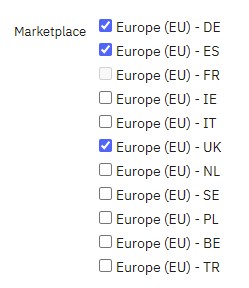 Let’s select the countries we want to group: Germany, Spain, France (in this example it appears as disabled because it is currently selected in the top menu) and UK.
On the server we will then remove the orders download CRON for Germany, Spain and UK, leaving the French one only.
The final result will be this one:
PRIMA
COUNTRY WEBCALLS N.
Italy 1
France 1
Spain 1
Germany 1
UK 1
5 webcalls in total.
AFTER
COUNTRY WEBCALLS N.
Italy 1
France, Spain, Germany, UK 1
With this configuration we reduce the number of webcalls towards Amazon from 5 to 2 requests.
As a rule of thumb, make sure to group in a single CRON countries for which you receive a lower number of orders, letting at least 10 minutes pass between one orders search and the next one, for example:
10:00 Italy
10:15 France, Spain, Germany, UK
10:30 Belgium, Netherlands, Turkey
10:45 Sweden, Poland, Ireland
With this configuration, equal to 4 requests per hour if each country or group of countries has less than 100 orders, the monthly wecalls total becaomes: 4 * 24 * 30 = 2880.
PENDING ORDERS HANDLING
A critical change you need to be aware of is the one related to pending orders. With the previous system it was possible to request Amazon up to 50 orders in a single request. Now, on the contrary, it is mandatory to request one order at a time.
If you have a very long list of pending orders in the respective module’s tab (which appears after enabling the Pending orders setting within the General tab), make sure to delete them with the bin icon, so that the module won’t try to download them causing a high consumption of your available webcalls budget (let the most recent ones that belong to the standard website daily routine).
Limit pending orders CRON usage to once an hour, even more if possible: those orders are already handled by the standard CRON, making the dedicated CRON usage necessary only if the order was set as shipped on Amazon before it was imported on the website.